HireNix ATS
Comprehensive Administrator & Operator Manual
Version 5.0 | Complete Master EditionMaster Table of Contents
- Introduction to HireNix ATS ................ Page 3
- Dashboard Overview ........................ Page 4
- Job Requisitions & Approvals ............ Page 5
- Top Management & Public Approval .... Page 6
- Job Openings & Marketing .............. Page 7
- Public Job Application Page .......... Page 8
- Separated Employee Data & Records .... Page 9
- Candidates Database & AI Parser ........ Page 10
- Candidate Status & Process Timeline .... Page 11
- Shortlist Management ................ Page 12
- Online Assessment & Proctoring ........ Page 13
- Candidate Live Chat & AI Bot .......... Page 14
- Interview Scheduling Hub ............. Page 15
- Calendar Integrations Hub ............ Page 16
- Interview Evaluations & Scorecards ... Page 17
- Offers & Onboarding Hub .............. Page 18
- Candidate Public Offer Portal ........ Page 19
- Analytics & Reporting Suite ........... Page 20
- AI & Automation Control Center ..... Page 21
- Compliance & Data Privacy ........... Page 22
- Roles & Permissions Management .... Page 23
- Billing & Payment Settings ......... Page 24
- System Settings & Organization Setup .. Page 25
- Live Admin Support Assistant ............ Page 26
Introduction to HireNix ATS
Welcome to HireNix ATS! This manual is designed to take a new user from their very first login to becoming a platform power-user. We walk through every single module on the left-hand navigation menu sequentially, detailing the purpose of the module, the configurations (presets) required to use it, interactive modal popups, and the exact step-by-step workflow to master it.
Dashboard Overview
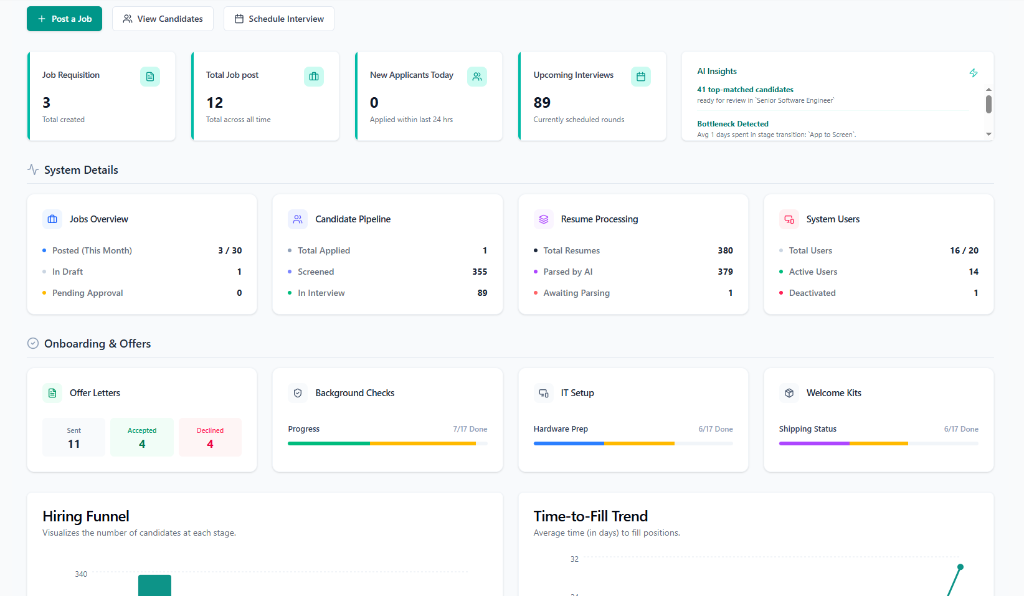
Analytics & NavigationPurpose: Your daily command center providing real-time metrics and system analytics. It gives a bird's-eye view of recruitment health, active jobs, candidate pipelines, and pending onboarding tasks.
Dashboard Interface:
Workflow & Features:
- Quick Action Buttons: Jump directly into active tasks by clicking 'Post a Job', 'View Candidates', or 'Schedule Interview'.
- Real-Time KPI Cards: Review metric counters ('Job Requisitions', 'Total Job Posts', 'New Applicants Today', 'Upcoming Interviews').
- AI Insights & Analytics: Monitor automated pipeline alerts, 'Hiring Funnel' bar chart, and 'Time-to-Fill Trend' velocity chart.
Job Requisitions
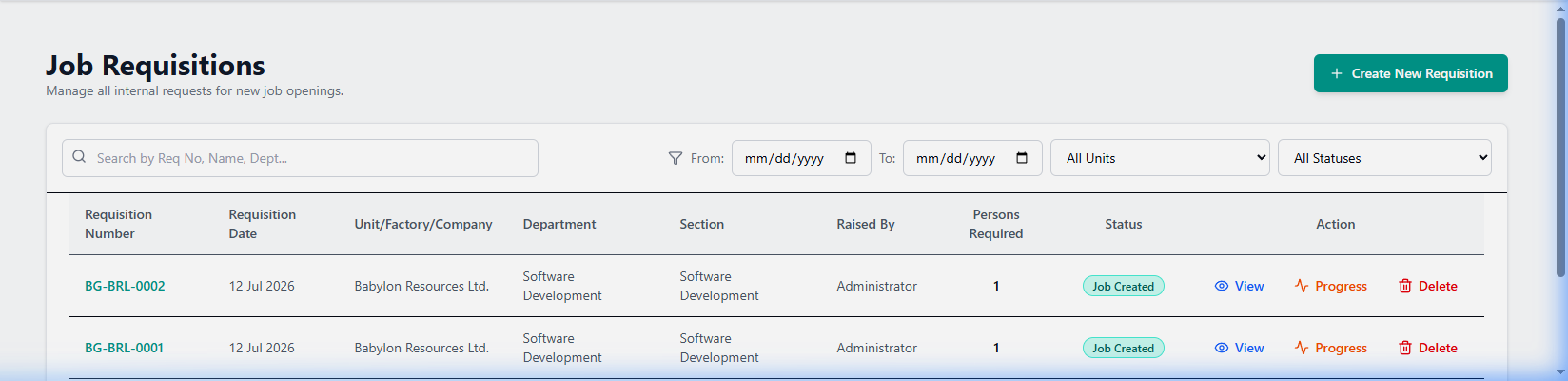
Planning PhasePurpose: Manage all internal requests for new headcount, customize requisition forms, dynamic Requisition ID building, and track multi-tier approval progress through management and HR.
Requisitions Interface:
Workflow & Features:
- Create Request: Click 'Create New Requisition', fill target details, budget, headcount, and click 'Save Draft' or 'Send For Approval'.
- Approval Progress Modal: Click 'Progress' to view real-time approver timestamps, feedback notes, and hierarchical sign-off status.
- Public Requisition Approval Portal: External approvers receive email token links (`/public/requisition-approval/[token]`) to review budget terms and click 'Approve' or 'Reject' without logging in.
Top Management Approval Portal
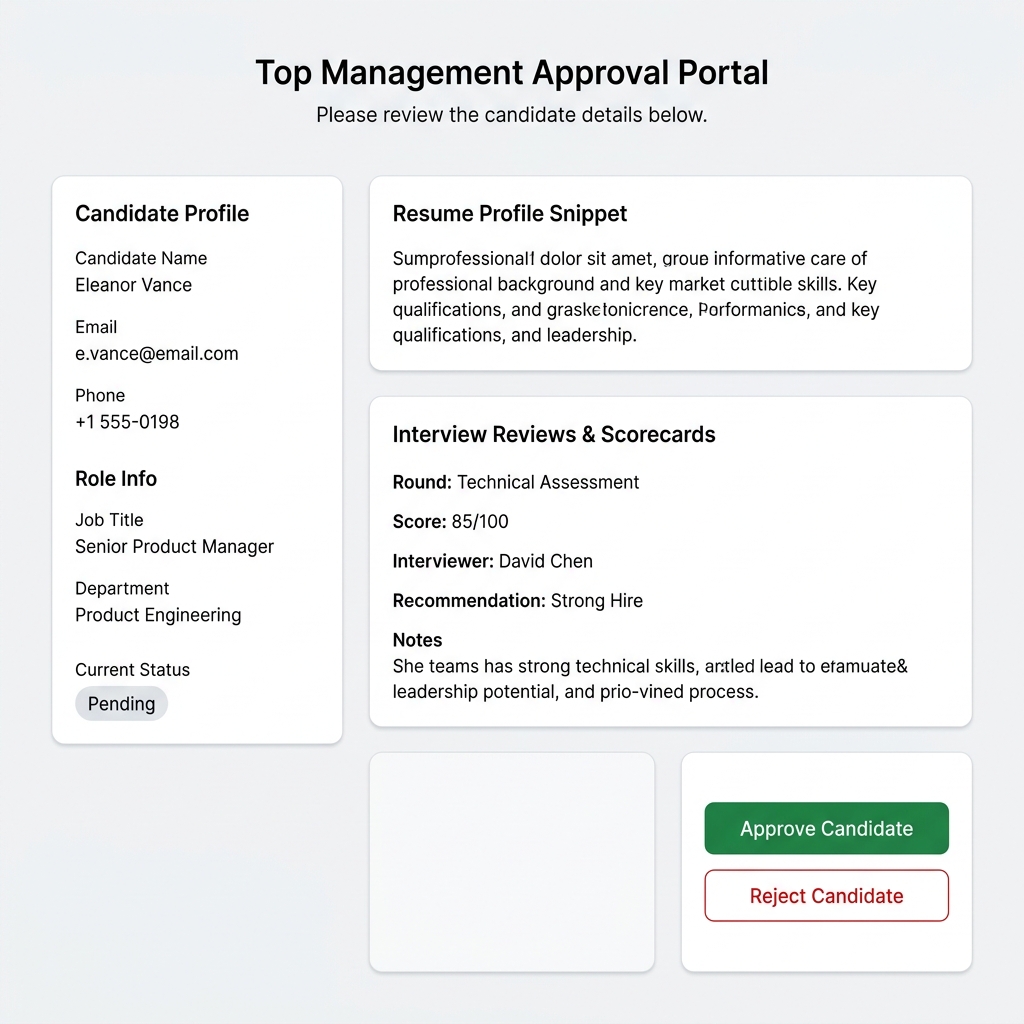
External PhasePurpose: A secure, tokenized external web portal allowing C-level executives and departmental directors to review candidate profiles and approve job offers and requisitions without an ATS account.
Portal Interface:
Workflow & Features:
- Secure Token Access: Approver opens secure token link sent to executive email (`/public/requisition-approval/[token]`).
- Review Context: Inspect candidate contact info, salary offer, resume snippet, justification, and past interview scorecard ratings.
- One-Click Decision: Click 'Approve Candidate / Requisition' or 'Reject' with mandatory feedback to instantly update the ATS database.
Job Openings & Marketing
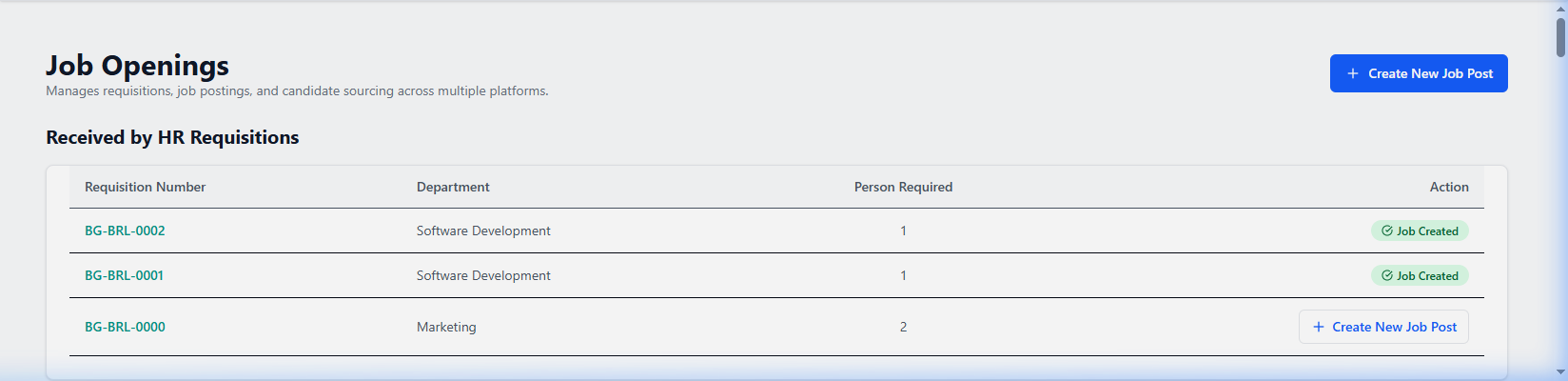
Marketing PhasePurpose: Central hub to create active job ads, configure custom interview rounds, AI job description generation, and publish referral links across 12+ social platforms.
Job Openings Interface:
Workflow & Features:
- Convert Requisition: Click 'Create New Job Post' on HR-approved requisitions to auto-populate job drafts.
- Social Sharing: Click 'Share' on any active card to generate tracked referral links (LinkedIn, WhatsApp, Slack, etc.).
- 5-Tab Job Dashboard: Manage Application Intake, Details, Interviews, Analytics, and Job Expense spend.
Public Job Application Page
Candidate PhasePurpose: The responsive external job landing page where prospective candidates review role descriptions, qualifications, and submit applications.
Public Apply Interface:
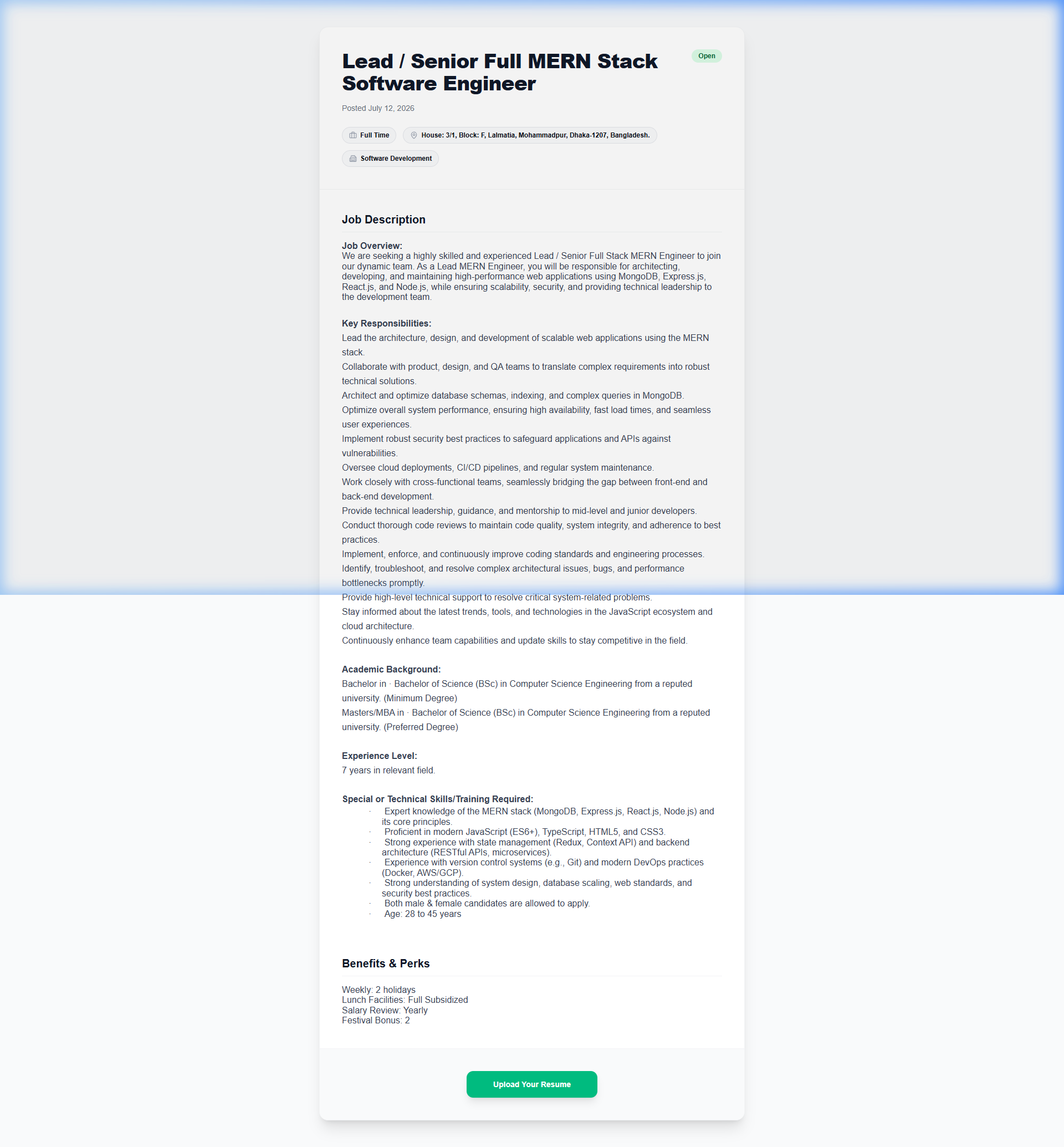
Workflow & Features:
- Role Landing: Candidate reviews company perks, responsibilities, compensation range, and work type.
- Submit Application: Candidate fills contact fields, drags-and-drops Resume (PDF/DOCX), and submits. Data auto-syncs to ATS.
Separated Employee Data & Records
Employee Records & OffboardingPurpose: Dedicated repository for managing past and offboarded organizational staff, recording departure reasons, tracking departmental clearances, archiving exit interview surveys, and managing rehire eligibility flags.
Workflow & Features:
- Separation Records & Reasons: Record and categorize departures (Resignation, Termination, Retirement, Contract Completion, Mutual Separation) with official exit dates and tenure calculations.
- Clearance & Asset Handover: Track sign-offs across IT equipment recovery, security badge deactivation, finance dues clearance, and HR paperwork completion.
- Rehire Eligibility Status: Set rehire status ('Eligible for Rehire', 'Ineligible', or 'Conditional Approval') with mandatory documentation notes.
- Exit Survey & Retention Analytics: Review structured exit interview ratings, feedback reasons, and department retention statistics to identify organizational turnover trends.
Candidates Database
Sourcing PhasePurpose: Master applicant database offering screening filters, Sci-Fi bulk AI resume parsing, custom skill weight scoring, blind screening, and candidate profile dashboards.
Candidates List Interface:
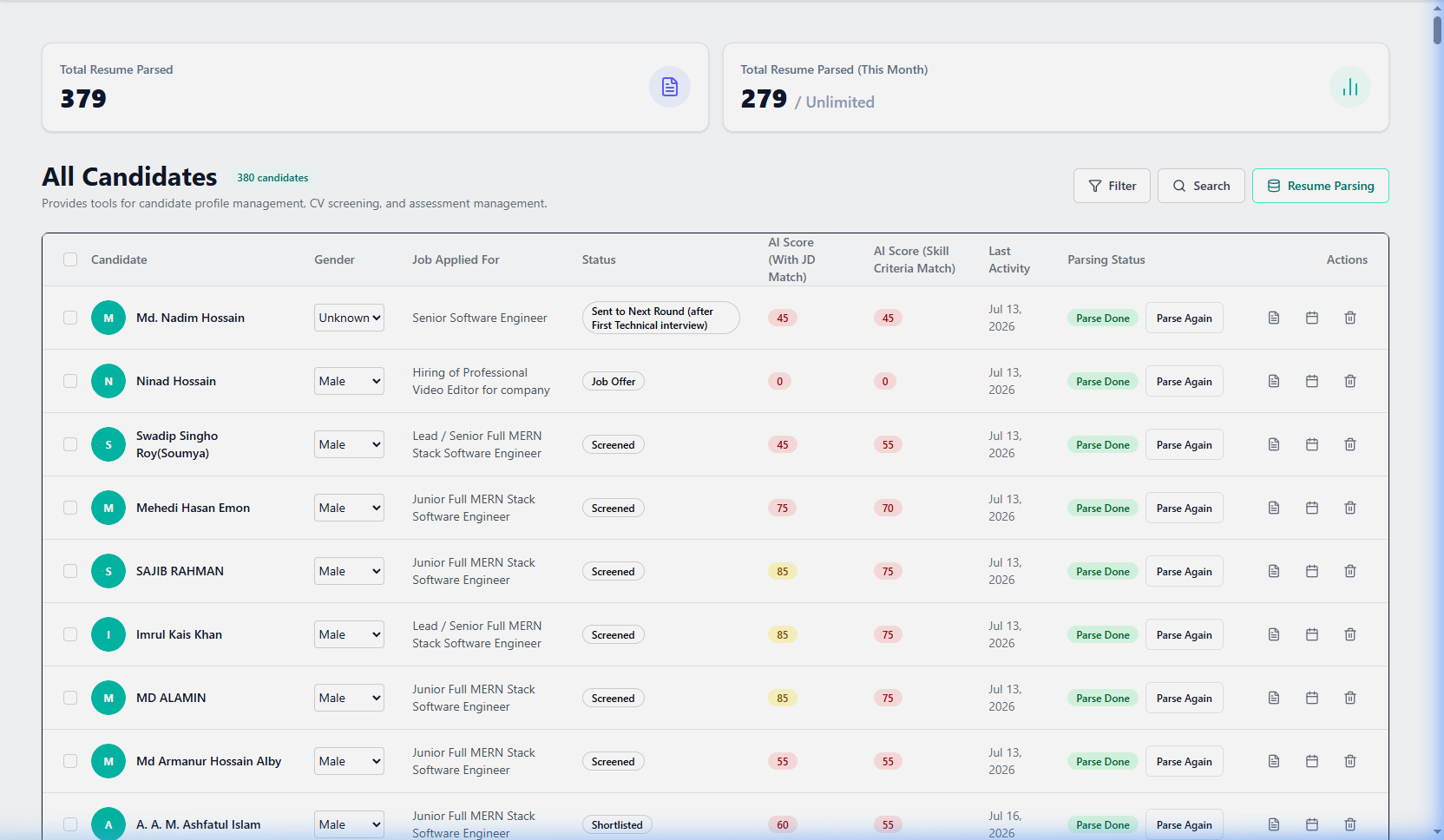
Workflow & Features:
- Sci-Fi Bulk Resume Parsing Engine: Select multiple applicants and trigger 'Resume Parsing' to launch the animated multi-phase parser (File Stream Reading → Skill & Experience Extraction → Score Calculation → Finalization).
- JD Match Breakdown & Custom Skill Criteria: Inspect overall match scores (0-100) alongside individual skill weight percentages (e.g., React 25%, Node 25%, System Design 25%, Communication 25%). Click 'Parse Again' to re-evaluate with updated criteria.
- Blind Screening Mode: Toggle 'Blind Screening' to automatically mask candidate names, photos, gender, and universities to eliminate hiring bias.
- 6-Tab Profile Dashboard: Click 'View Profile' to inspect Overview, Resume Preview, Interview Reviews, Schedule, Exam Proctoring Results, and Stage Action History.
Candidate Status, Funnel & Process Flow Timeline
Assessment & Funnel PhasePurpose: 3D visual hiring funnel with full-screen stage action popups, dual view switcher (Table vs Cards), and the real-time Process Flow Timeline & Stage Bottleneck Chart.
Pipeline Funnel Interface:
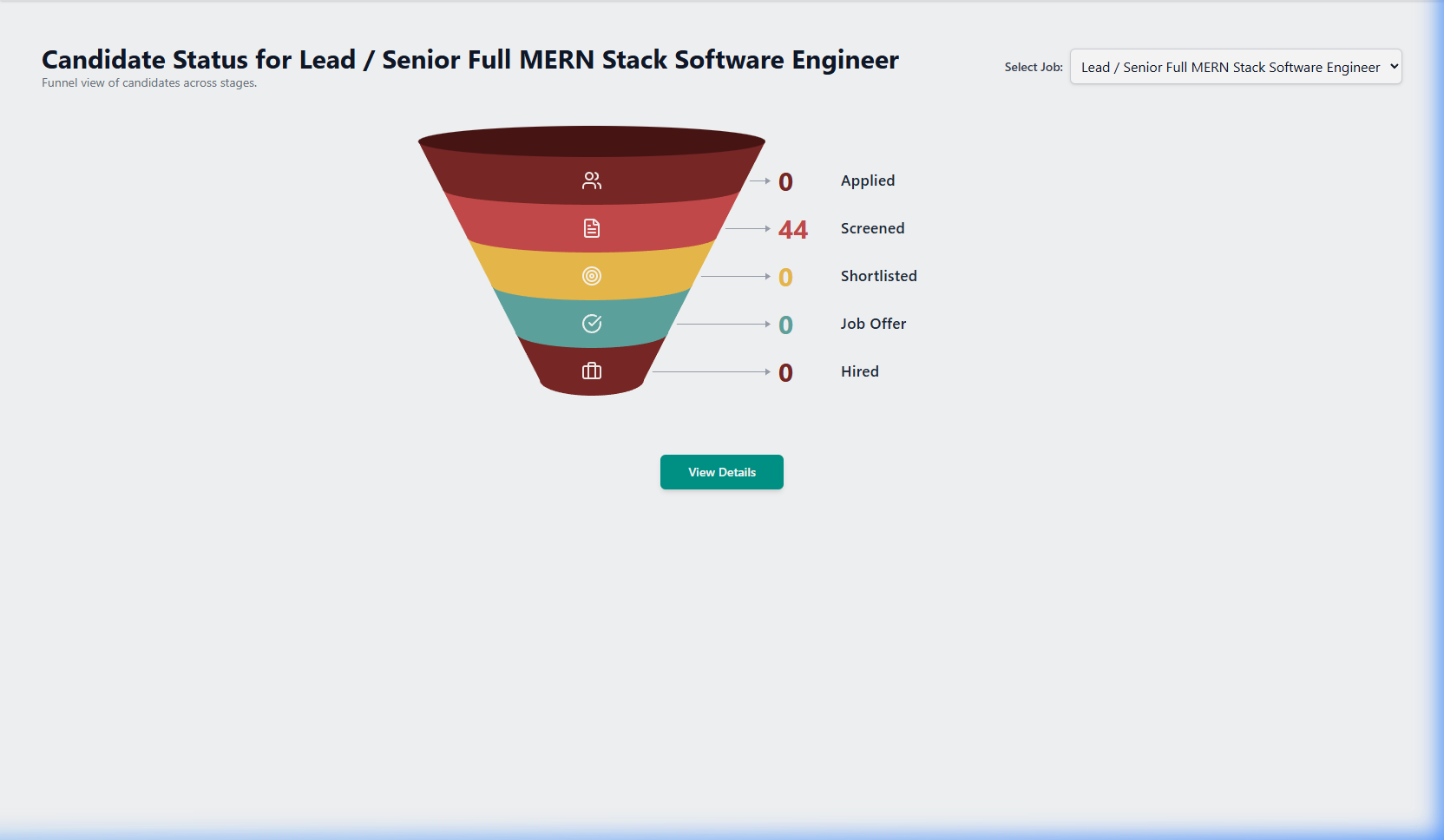
Workflow & Features:
- Process Flow Timeline & Stage Analytics: Inspect the integrated timeline chart showing live recruitment stages from Requisition to Hire. Switch between Timeline View (visual stage milestones with candidate count pills), Gantt / Chart View (duration vs SLA targets), and Detailed Table View (Start/End criteria, average duration with Days / Hours metric toggle).
- 3D Interactive Funnel & Stage Modals: Click any 3D hiring funnel cylinder layer or summary card to launch full-screen stage candidate management modals with search and bulk actions.
- Direct Stage Action Buttons: Advance candidates seamlessly by clicking 'Call for Interview', 'Offer & Onboarding', 'Parse Resume', or 'Create Shortlist' directly from stage cards.
- Dual View Modes: Toggle between Table View (displaying round-matched online exam scores, AI match %, and recruiter notes) and Cards View (visual candidate cards with quick action pills).
Shortlist Management
Screening PhasePurpose: Curate candidate folders per interview round, score against round criteria, and enforce multi-round progression logic.
Workflow & Features:
- Make Shortlist Builder: Click 'Make Shortlist', select job, select target round, set match score sliders, and filter by gender.
- Bulk Addition: Click 'Add All Filtered Candidates To Shortlist' for one-click candidate folder creation.
- Curated Review: Hiring Managers click the eye icon to launch the curated shortlist review modal.
Online Assessment Results & Proctoring Gateway
Assessment PhasePurpose: Admin exam results dashboard with question breakdown & secured anti-cheating proctoring candidate exam portal.
Admin Exam Participant Interface:
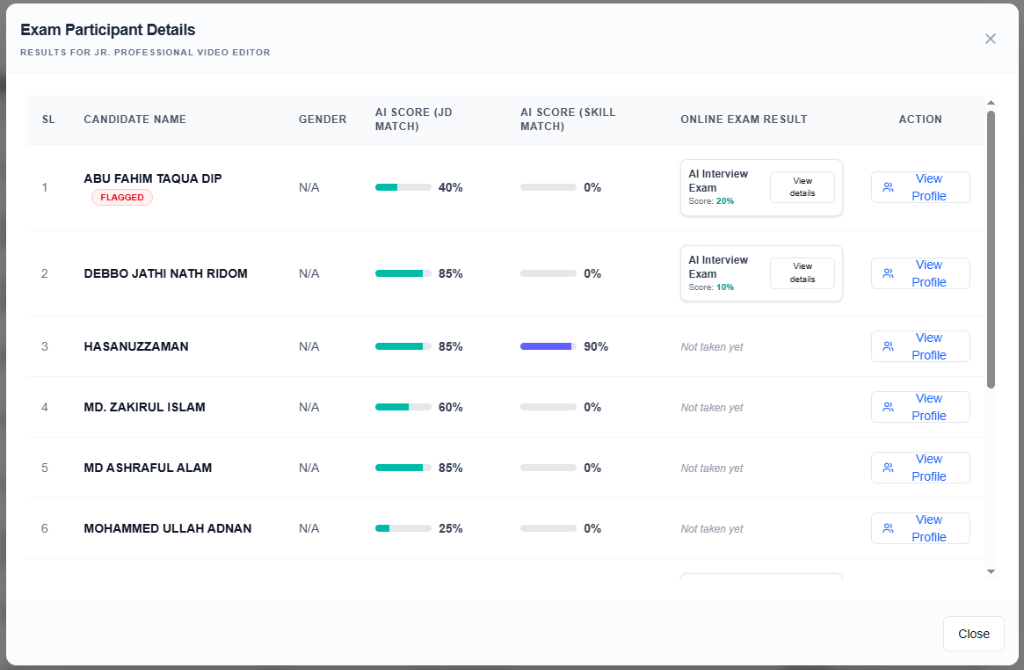
Workflow & Features:
- Anti-Cheating Proctoring Gateway: Candidates take exams within a secured portal enforcing mandatory fullscreen, active tab/window blur strike tracking, dynamic candidate email watermarking, and auto-submit on excessive violations.
- Round-Matched Exam Scores: View candidate online assessment scores mapped automatically to corresponding interview rounds with pass/fail indicators.
- Question-by-Question Diagnostic Modal: Click any participant to review detailed candidate answers, correct solutions, time spent per question, and security strike logs.
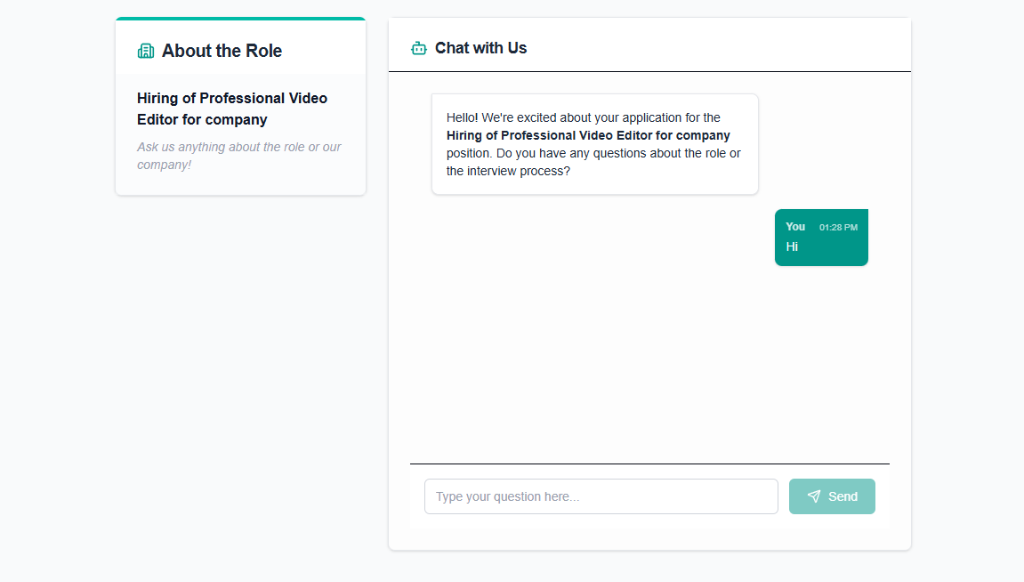
Candidate Live Chat & AI Assistant
CommunicationPurpose: Real-time WebSocket candidate-recruiter messaging portal with automated AI assistant responses.
Chat Interface:
Workflow & Features:
- Real-Time Candidate Messaging: Two-way WebSocket chat portal between recruiter and candidate with message delivery timestamps, read status, and file attachments.
- AI Auto-Pilot Bot: Enable AI auto-reply to automatically answer candidate questions regarding interview details, company perks, and job requirements using grounded ATS context.
Interview Scheduling Hub
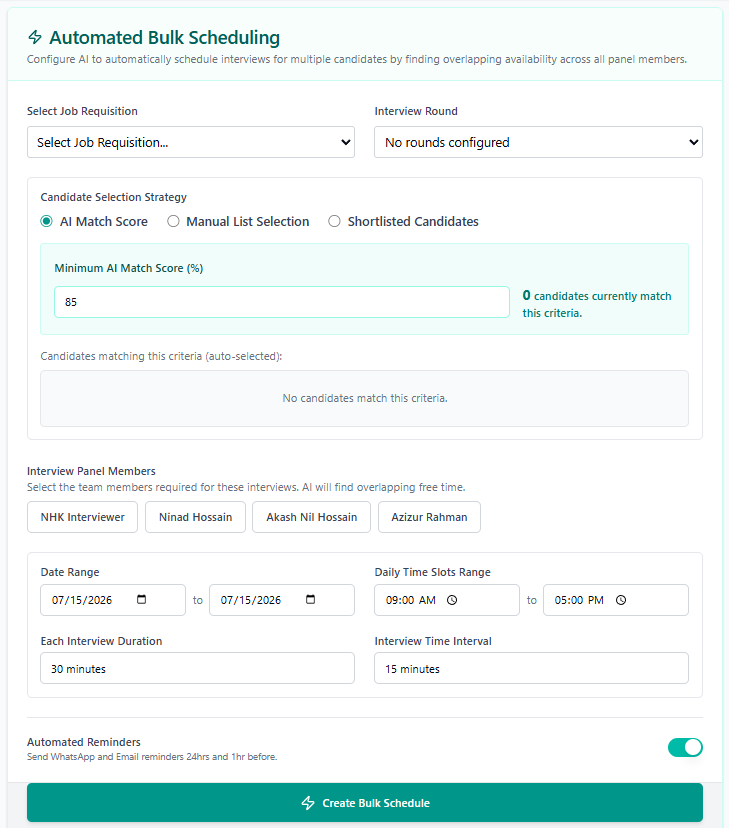
Evaluation PhasePurpose: Calendar scheduling hub supporting Single Candidate scheduling, Automated Bulk scheduling, and Created Schedules management.
Bulk Scheduling Interface:
Workflow & Features:
- Single Candidate Scheduling: Select candidate, target round, and panel. Panel Availability Calendar View resolves slot conflicts.
- Automated Bulk Scheduling: Select candidates by AI match % threshold, shortlist, or manual list. Set date range & buffer intervals. AI auto-assigns non-conflicting time slots & sends Zoom/Teams links.
- Created Schedules Table: Filter, edit, or bulk delete active interview schedules.
Calendar Integrations Hub
Integration & SyncPurpose: Real-time 2-way corporate calendar integration supporting Google Calendar, Microsoft Outlook / Office 365, Apple iCal, and CalDAV servers.
Workflow & Features:
- Connect Provider: Click 'Connect Google Calendar' or 'Connect Outlook' to authorize 2-way scheduling sync.
- Working Hours & Buffer Time: Define panel working hours (e.g., 9:00 AM - 5:00 PM) and mandatory buffer intervals between interviews (e.g., 15 mins).
- Automated Conflict Detection: System automatically queries interviewer calendars live to hide busy slots when scheduling.
Interview Evaluations & Scorecards
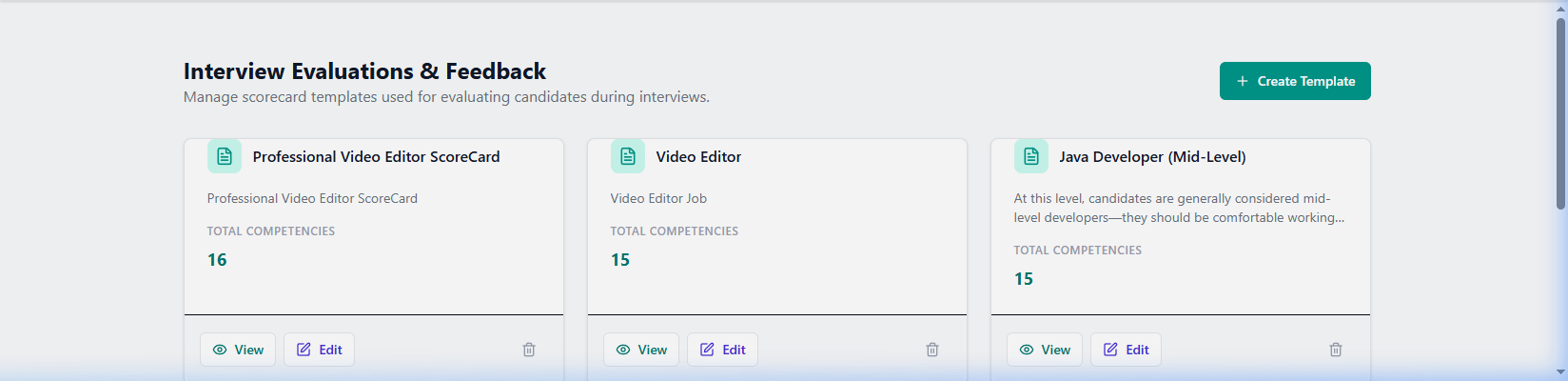
Evaluation PhasePurpose: Standardized scorecard templates, objective 1-4 competency ratings, and structured evaluation collection.
Scorecard Form Interface:
Workflow & Features:
- Printable Form Preview: Click 'View' on scorecard templates to inspect Core/Functional competencies, 1-4 rating scales, and recommendation fields.
- Dynamic Scorecard Builder: Create or edit scorecard templates and publish to active job interview rounds.
Offers & Onboarding Hub
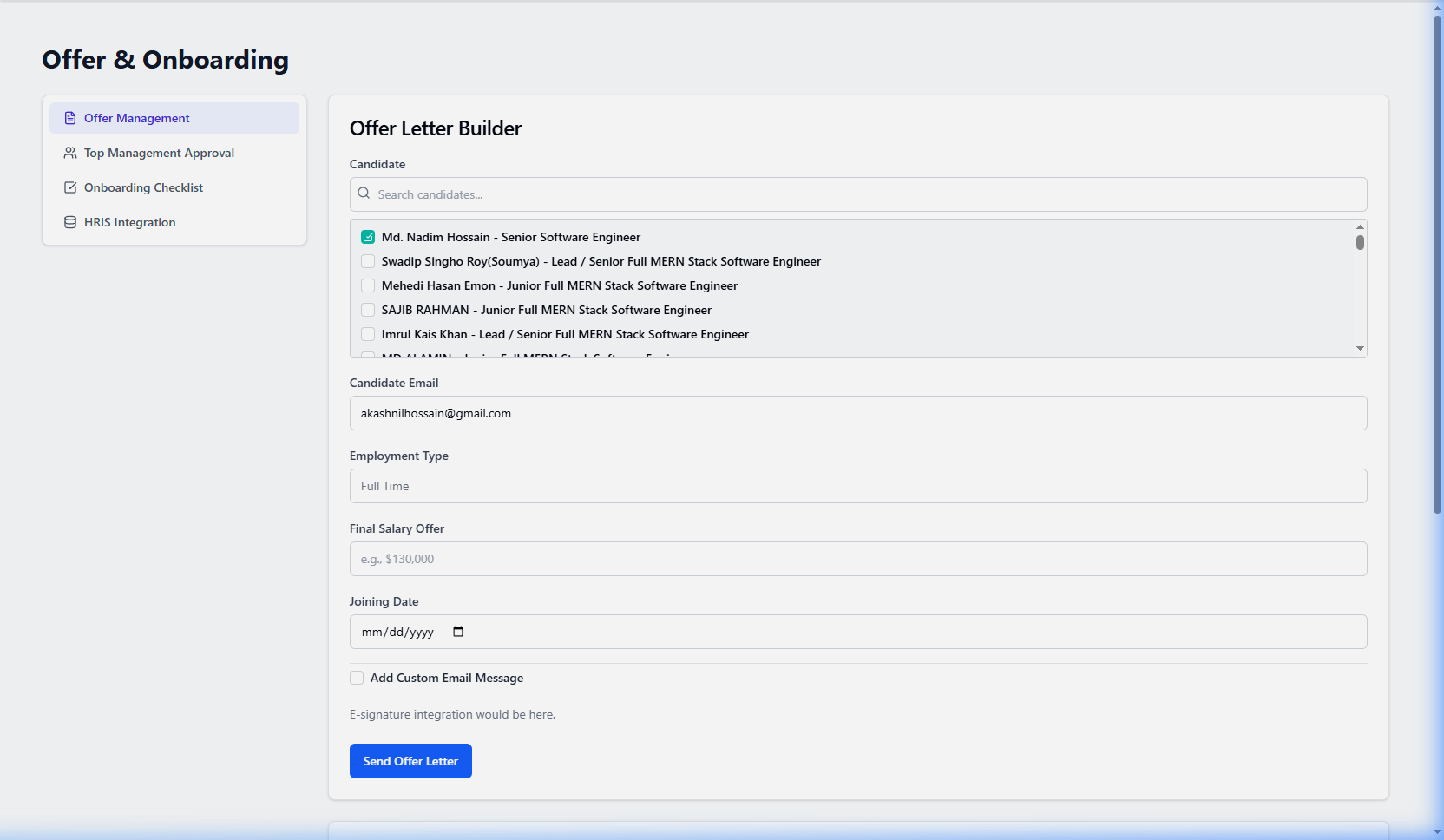
Hiring PhasePurpose: Digital offer letters with 50+ themes, executive approval workflows, structured compensation breakdown, onboarding checklists, and HRIS API exports.
Offers Interface:
Workflow & Features:
- Generate Job Offer: Input offered salary breakdown (Base, Bonus, Equity, Benefits), joining date, template theme (50+ options), and route for executive token approval.
- Candidate Digital Offer Page: Candidate receives secure link (`/offer/[id]`) to review full offer, sign digitally, accept, decline, or submit counter-terms.
- Onboarding Checklist & HRIS Export: Track IT setup & welcome kit tasks; push hired records to HRIS API.
Candidate Public Offer Portal & Digital Signature
Candidate OnboardingPurpose: An interactive, candidate-facing offer acceptance portal (`/offer/[id]`) enabling candidates to inspect company letterhead terms, view detailed compensation breakdowns, execute digital e-signatures, accept/decline, or request counter-proposals.
Workflow & Features:
- Interactive Letterhead Preview: Candidate reviews company branding, position duties, reporting hierarchy, joining date, and detailed compensation package.
- Digital E-Signature Canvas: Candidates can draw their live signature using touch/mouse or type their name with automated cryptographic timestamp stamping.
- 1-Click Decision Workflow: Candidate chooses 'Accept Offer' (auto-locks offer, generates signed PDF, triggers onboarding checklist), 'Decline Offer' (prompts structured feedback reason), or 'Request Counter-Offer' (submits notes back to recruiter).
- Instant Certificate PDF Download: Both recruiter and candidate receive verifiable PDF copies with digital seal certificates.
Analytics & Reporting Suite
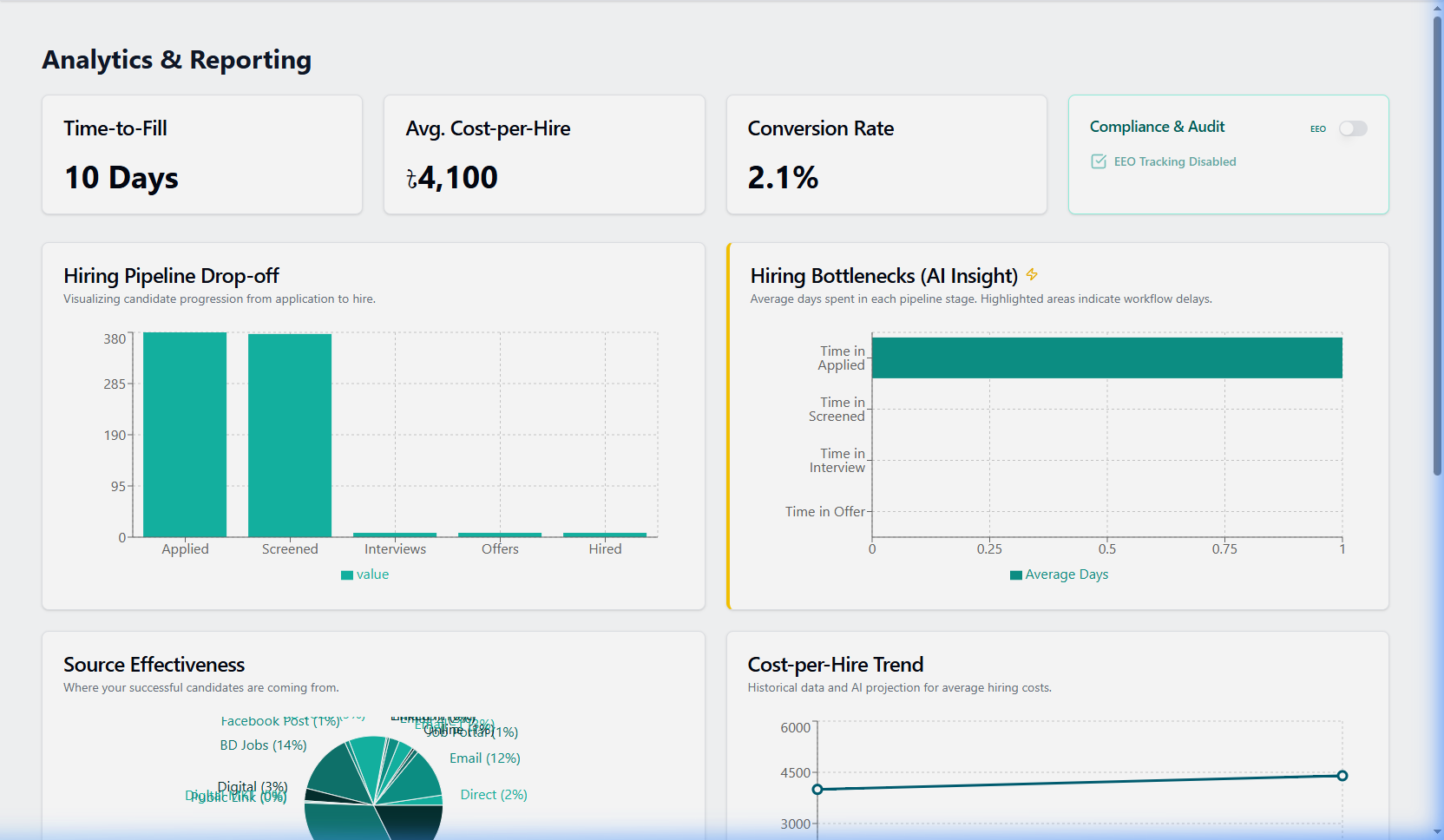
Management PhasePurpose: Data visualization suite analyzing recruitment bottlenecks, velocity metrics, DEI demographics, EEO compliance, and source ROI.
Analytics Interface:
Workflow & Features:
- Executive KPIs & Red Alerts: Review Time-to-Fill and Cost-per-Hire. Stages exceeding 10 days display Red Alert Bottleneck Flags.
- EEO 4/5ths Rule Audit: Run Adverse Impact Analysis across demographics and export compliance audit reports.
- Source ROI & Conversion Velocity: Track applicant conversion rates from LinkedIn, Careers Page, Referrals, and Job Boards.
AI & Automation Control Center
AI Engine SettingsPurpose: Central configuration hub for AI resume parsing, candidate match scoring model parameters, JD generator, and automated workflow triggers.
Workflow & Features:
- AI Resume Parser Sensitivity: Adjust weightings for skill match vs experience years vs education degree relevance.
- Automated Trigger Triggers: Configure auto-shortlisting for candidates scoring above 85% and auto-rejection for candidates under threshold.
- AI Bias Prevention Filters: Enforce blind screening rules and monitor AI recommendations for demographic neutrality.
Compliance & Data Privacy
Governance PhasePurpose: Enterprise compliance control panel for GDPR candidate right-to-be-forgotten requests, system audit logging, and background check integrations.
Workflow & Features:
- Right to be Forgotten: Search candidate names in Compliance and click 'Execute Right to be Forgotten' to permanently scrub PII data.
- System Audit Logging: Review immutable activity logs tracking user logins, candidate exports, role updates, and salary viewing.
- Background Check Vendor Integration: Track automated candidate background screening status (Checkr, Sterling, HireRight).
Roles & Permissions Management
Security & RBACPurpose: Multi-tenant Role-Based Access Control (RBAC) engine supporting 14 predefined system roles and granular permission matrix customization.
Workflow & Features:
- Permission Matrix Configuration: Toggle granular access permissions for Job Creation, Candidate Access, Salary Details, Evaluation View, and System Settings per role.
- Custom Role Creation: Click 'Add Custom Role', specify role title and description, select permission checkboxes, and save.
- User Role Assignment: Assign one or multiple system roles to active staff members with real-time permission synchronization.
Billing & Subscription Management
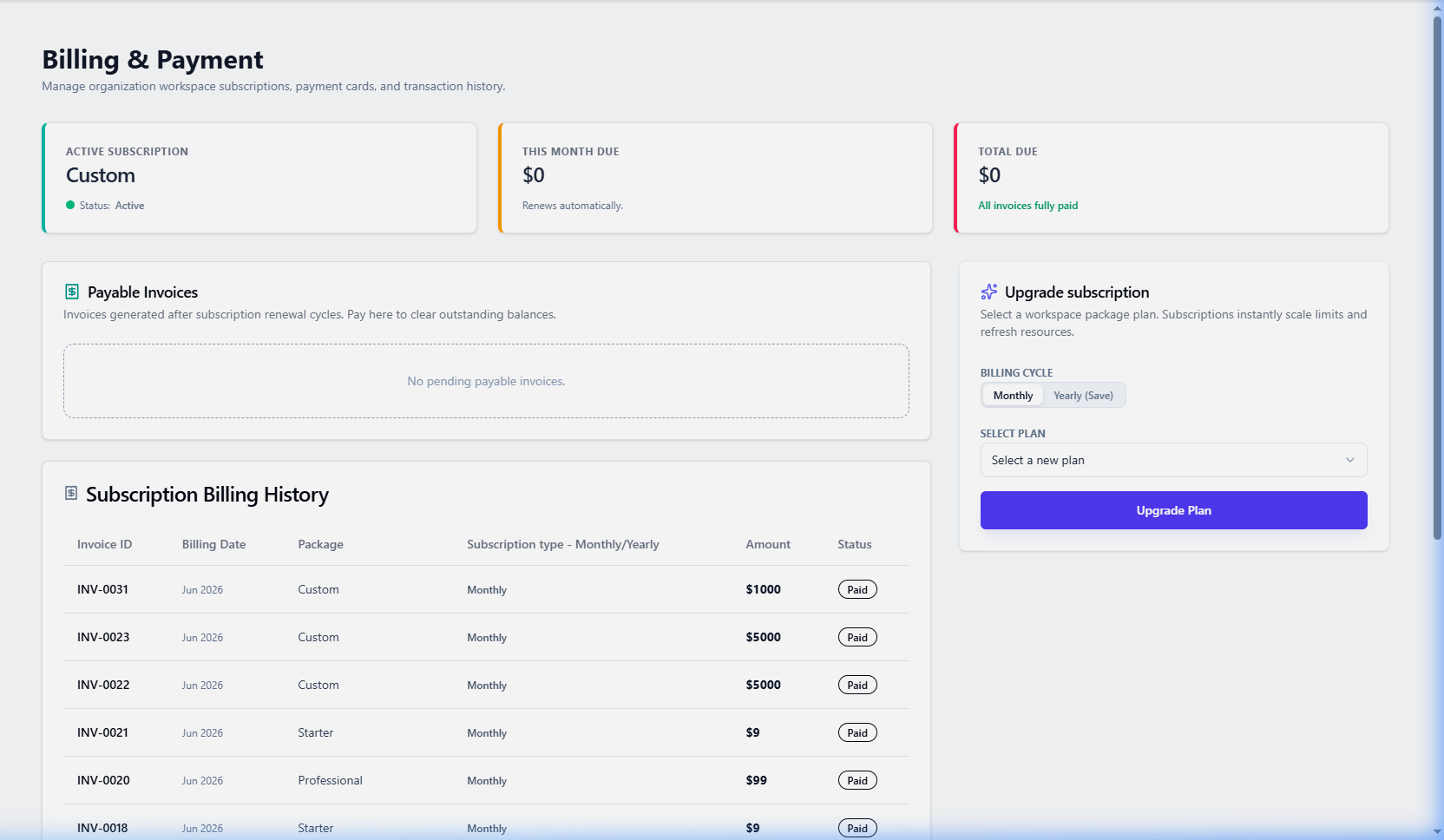
Admin FinancePurpose: Account subscription plan management, active seat metrics, AI credit usage tracking, payment methods, and invoice downloads.
Billing Interface:
Workflow & Features:
- Plan Tier Upgrade: Select between Starter, Growth, and Enterprise subscription tiers with live feature comparison.
- Payment Gateway: Pay monthly or annual subscription invoices securely via credit card or payment gateway integration.
- Invoice History: Download official VAT/tax receipts and payment invoices for accounting audit compliance.
System Settings & Organization Setup
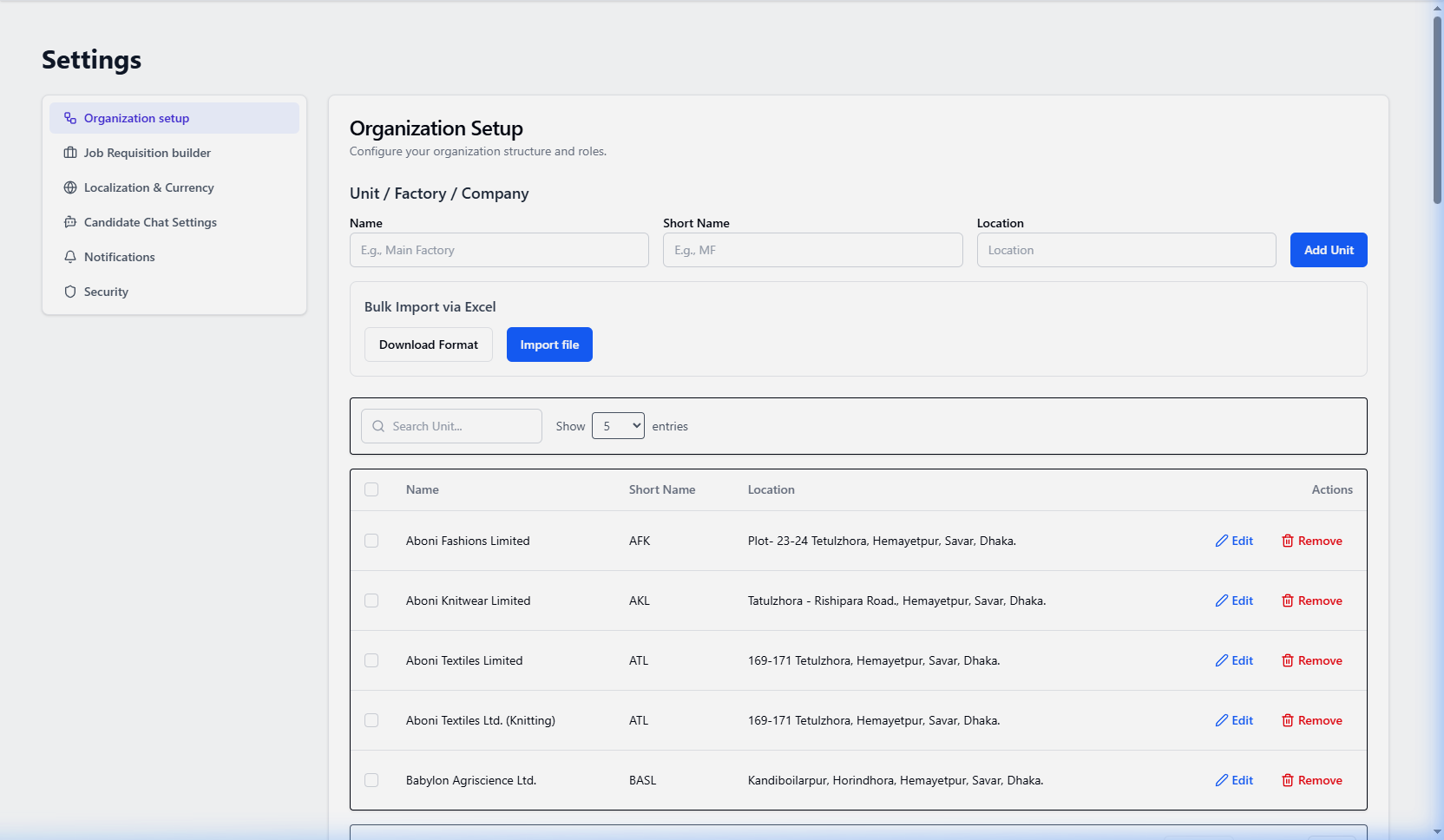
Admin SettingsPurpose: 5-tier organizational structure with Excel bulk import/export, Job Requisition ID Builder, Offer Letter Builder (50+ themes), and SMTP setup.
Organization Setup Interface:
Workflow & Features:
- 5-Tier Hierarchy Excel Import: Download `.xlsx` template, populate 5 hierarchy levels offline, and bulk import instantly.
- Offer Letter Builder (50+ Themes): Accordion panels, 50+ letterhead themes, dynamic merge tags (`{{candidate_name}}`), salary breakdown tables, and live preview.
- SMTP Server Setup: Configure corporate mail server to dispatch system notifications and offer letters.
Live Admin Support Assistant & Technical Diagnostics
In-App SupportPurpose: An intelligent, floating in-app support assistant available across all Admin workspace screens, providing instant AI troubleshooting, client diagnostic telemetry sharing, attachment uploads, and 1-click human ticket escalation.
Workflow & Features:
- Floating Support Trigger: Click the floating 'Get Support' / 'HireNix AI Assistant' badge at the bottom-right corner of any admin screen or click 'Help' in the header bar to open the support dialog.
- Automated Client Diagnostics: The assistant automatically captures safe client telemetry (Current Route, OS, Browser, Screen Resolution, Tenant Subscription Tier, and recent client error logs) to diagnose issues immediately.
- Attachment & Screen Recording Uploads: Upload screenshots or recorded `.webm` screen videos directly within the chat to demonstrate technical glitches to the support system.
- Instant Human Agent Escalation: When asking complex questions, billing inquiries, or clicking 'Talk to a Human Rep', the session is instantly escalated to Superadmin Live Agents with real-time WebSocket notifications.